The Pacto Operational Graph
The operational graph answers questions that span many services: what depends
on payments-api, which revision runs in production-eu, is any of it failing its
contract and how sure are we? It joins contracts, their published revisions and
the places they run into one view that people, CLIs, platforms and agents can
query.
pacto fleet search                                     # services found under .
pacto fleet graph payments-api --direction dependents  # who depends on it
pacto fleet status                                     # what needs attention
The graph is read-only. It collects results that other parts of Pacto produce.
Three identities
The graph models three distinct things and keeps them separate: a name, a revision and a running instance answer different questions.
| Identity | What it is | Example |
|---|---|---|
| Logical service | A stable name and owner. It has revisions and runs in targets. | payments-api (owner: payments) |
| Contract revision | An immutable resolved revision. Identity is the service plus a content digest: the source's immutable digest, or one derived from the whole bundle when the source has none. A ref or a version is never an identity. Pacto omits a revision that it can neither pin nor hash. | payments-api@sha256:… |
| Operational target | A concrete place a revision runs, generic as scope/kind/name. |
production-eu/customer-a → kubernetes-workload payments/payments-api |
How certainly a target is matched to a revision
A target can exist before Pacto knows which revision it runs, so every target records how the link was made.
| Match | What Pacto knows |
|---|---|
exact |
The target's content digest matches a revision's. Authoritative: this is the revision running there. |
inferred |
A unique correlation by mutable tag or version suffix. Probably right, but unproven. |
ambiguous |
Several revisions match that mutable reference. Pacto makes no link, and the target carries a REVISION_LINK_AMBIGUOUS limitation. |
unresolved |
Nothing matched, or the target's identity contradicts itself. No link, and a limitation on the target saying so. |
The bottom two sit on the target itself, so a consumer can classify a link without parsing snapshot-level messages. The two read surfaces spell it differently, and the CLI's spelling has a trap:
- Snapshot and
pacto fleet get --targetJSON carryrevisionMatch, which isomitemptyand only everexactorinferred. An absentrevisionMatchis the finding: it means ambiguous or unresolved. Read the target'slimitationsto learn which. - The entity-detail API (
GET /api/fleet/entities/target?key=…, what the dashboard reads) carrieslinkState, always present, with all four values.
This inferred differs from the inferred relationship provenance below: one is how a target was matched to a revision, the other how an edge
was derived.
Relationships: declared, observed, inferred
Each edge carries a provenance discriminator that records where the fact came from:
- declared: from a contract (
dependencies[], and config/policyrefs). - observed: seen in running traffic. Pacto keeps observed edges in their own adjacency index, so declared and observed answers stay separate.
- inferred: deduced heuristically. Reserved for future use; Pacto produces none yet.
- declared+observed: one edge backed by both. The neighborhood projection merges the two indexes for display and emits this combined value, so a consumer branching on provenance must handle all four.
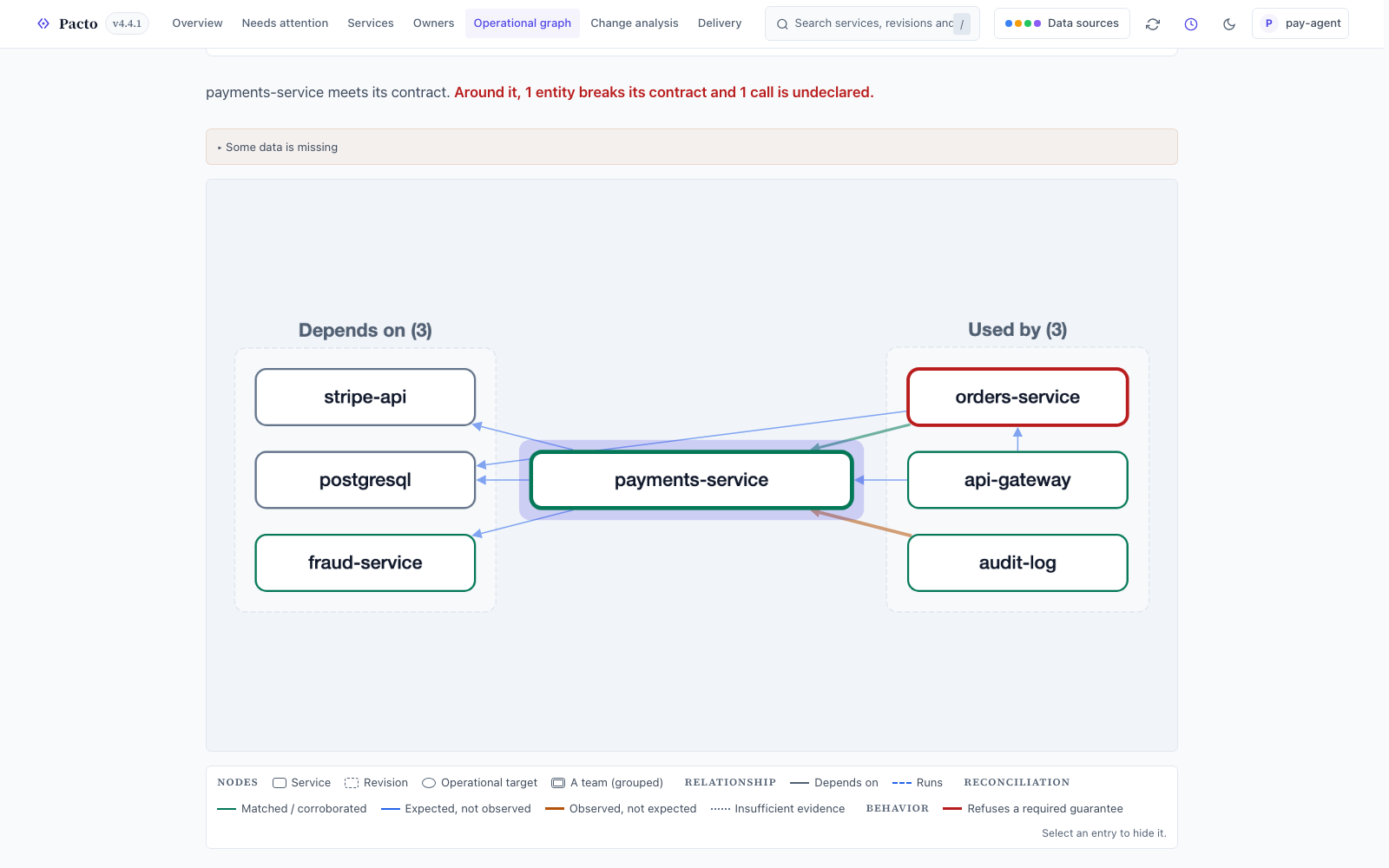
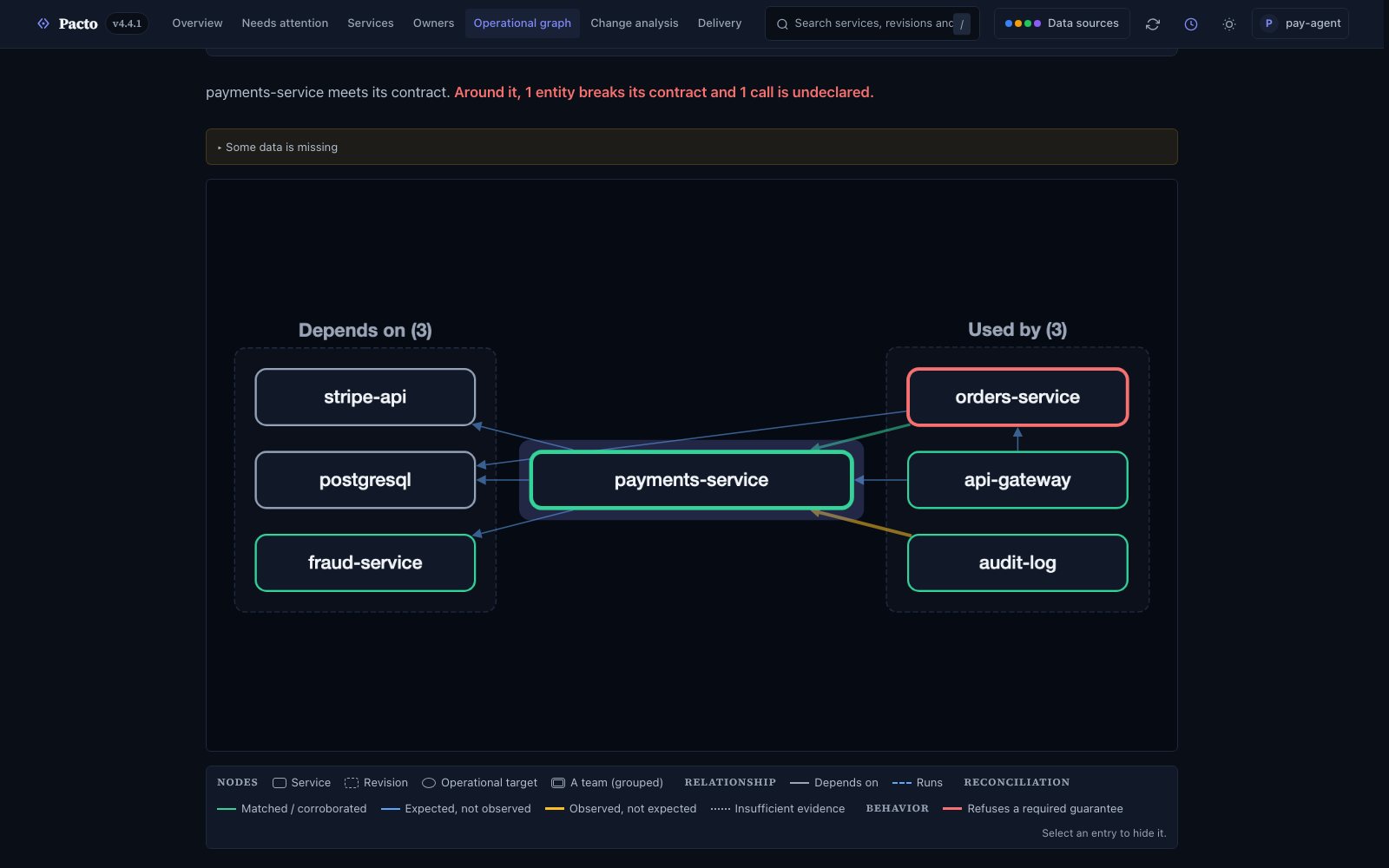
The dashboard's Operational Graph draws each edge by what backs it: matched, expected but not observed, or observed but not expected.
Sources and queries
The graph is assembled from sources, each contributing what it can see right now: contracts in your registry, local folders, live Kubernetes, the Evidence Server and target-state files. It answers five kinds of question (search, get, graph, status and explain). The operational graph reference lists every source, the target-state file format, the query semantics and the canonical owner key.
Knowledge
Every Pacto answer records how much of the world it saw. Each word below is a separate claim.
| Word | Claim |
|---|---|
| complete | Every source answered. Nothing is missing. |
| empty | Every source answered and there is genuinely nothing. This is complete knowledge of an empty result. |
| partial | At least one source was unavailable, stale or itself partial. What you see is a floor. |
| stale | Every source answered, but one of them last saw the world a while ago. Its records are real and may have moved on since. |
| unavailable | A source did not answer at all. Whatever it knows is missing from this answer entirely. |
| unknown | No completeness value arrived. This differs from empty. |
Three of these travel on the wire, in every answer's meta.completeness:
complete, partial and empty. The other three are a consumer's reading of the
same envelope: stale and unavailable come from the per-source health reported
alongside it, and unknown is what is left when no envelope arrived at all. The
dashboard takes the worst of the six and gates every all-clear on that, so a
source that is down shows even when the snapshot calls itself complete.
An unavailable source means missing data. A partial answer with zero rows is a set Pacto could not finish building.
Who consumes it
A human portal and an agent consume the same graph.
flowchart LR
    subgraph Sources["Sources"]
        OCI["Contracts in OCI<br/>published revisions"]
        LOCAL["Local bundles<br/>revision being edited"]
        K8S["Live Kubernetes<br/>Pacto CRs: which revision runs where"]
        EVI["Evidence Server<br/>signed EvidenceSet reports"]
    end
    OTEL["OTel trace file<br/>offline analysis"]
    OCI --> OG
    LOCAL --> OG
    K8S --> OG
    EVI --> OG
    OTEL -->|--traces| OG
    OG["Operational Graph<br/><i>immutable read model</i>"]
    OTEL --> RECON["reconcile · impact<br/>declared vs observed"]
    OG --> RECON
    OG --> Q["Queries<br/>search · get · graph · status · explain"]
    Q --> DASH["Dashboard"]
    Q --> CLI["CLI<br/>pacto fleet …"]
    Q --> MCP["MCP fleet tools"]
    Q --> PLAT["Platforms"]
Q --> AGENT["Agents"]- Dashboard: the visual front door. It builds one snapshot from every source
it detects and serves the graph and change analysis through
/api/fleet/*. The endpoints the UI reads (overview, entities, neighborhood and attention) carry their ownschemaVersion,pacto.dev/fleet-product/v1, so a UI versions independently of thepacto.dev/fleet/v1snapshot export above. The Operational Graph view offers three perspectives (Services, Revisions and Operational targets) and a Knowledge control (Expected · Observed · Differences). An operational target links to the dependency service it depends on. It draws no target-to-target mesh, because the snapshot has not observed that runtime routing. - CLI (
pacto fleet …): the five queries on the command line, plusreconcileandsnapshot. Scriptable, deterministic output. - MCP fleet tools:
pacto_fleet_search,pacto_fleet_get,pacto_fleet_graph,pacto_fleet_statusandpacto_fleet_explain, pluspacto_impact, give an agent read-only understanding of the operational system. See MCP integration for how they differ from authoring tools and generated service tools.
A read model around many evaluations
Compliance is the pure Evaluate(Contract, EvidenceSet) function producing
findings for one service in one environment (see the Pacto
model). The graph is the read model around many such
evaluations. It references each target's findings and coverage as the engine
produced them.
flowchart TB
    subgraph Eval["Per-target evaluation (the engine, one at a time)"]
        C["Contract"] --> EV["Evaluate"]
        E["EvidenceSet"] --> EV
        EV --> F["Findings + Coverage"]
    end
    C -.-> OG
    F -.-> OG
    OG["Operational Graph<br/>composes many revisions + many targets"]
    OG --> ANS["Query answers<br/>with asOf · completeness · limitations"]
The graph also maintains a reverse-dependency index, which is what impact analysis traverses to answer "if this revision ships, which consumers are affected, directly and transitively".
Observed dependencies and reconciliation
Declared intent is half the picture; the other half is what traffic does.
The OTel observer (pacto otel observe <traces.json>) is an offline analyzer:
it reads an exported OTLP/JSON trace file and derives the caller-to-callee edges
its outbound spans prove. A missing span is no proof that a dependency is absent, so the observer reports only edges it saw. It can also
emit signable EvidenceSets (pacto otel observe --evidence) so observed
dependencies travel the same evidence protocol as any
other report.
Those observed edges meet the declared graph in three places:
- The snapshot itself:
pacto fleet --traces <file>andpacto dashboard --tracesresolve each raw observed endpoint name to a unique domain-qualified service and fold resolved edges in asobservedrelationships. A name that matches zero or more than one service stays unresolved and becomes anOBSERVED_IDENTITY_UNRESOLVEDlimitation, so observed traffic is always attributed to the right domain or to none. - Reconciliation:
pacto fleet reconcile --traces <file>labels each dependency matched, declared-not-observed (dormant or unseen in the window) or observed-not-declared (a shadow dependency the contract never mentions). Anything unresolvable goes into a separate unresolved category. - Impact:
pacto impact --traces <file>feeds the same observed edges into the affected-consumer list; the confidence model has what they change there.
The backend computes reconciliation: every declared edge carries a state
computed against the snapshot's observed edges. A snapshot with no observation
data returns insufficient, so an empty Observed view never reads as "there is
no traffic".
The fleet is a view
Pacto discovers the graph from the sources you already have. A contract has
no kind: Fleet and no fleet: section, because a hand-maintained fleet list
drifts the moment a team adds a service. The fleet is a view, computed on
demand and versioned by its as-of time.
What's next
- Operational graph reference: sources, the target-state file, query semantics and owner keys
- The Pacto model: the engine, the compliance states and the boundaries the graph inherits
- Impact analysis: the consumers a change affects, projected onto this graph
- Fleet tools: the dashboard,
pacto fleetand the terminal UI - MCP integration: the three MCP tool families